How peer2peer.group Works — For Hosts and Members
One platform. One method. Every session delivers.
Whether you're running a peer group or joining one, peer2peer.group handles the logistics so every conversation is built around what the room actually needs — and every member walks away with something they can use.
Launch your group in minutes.
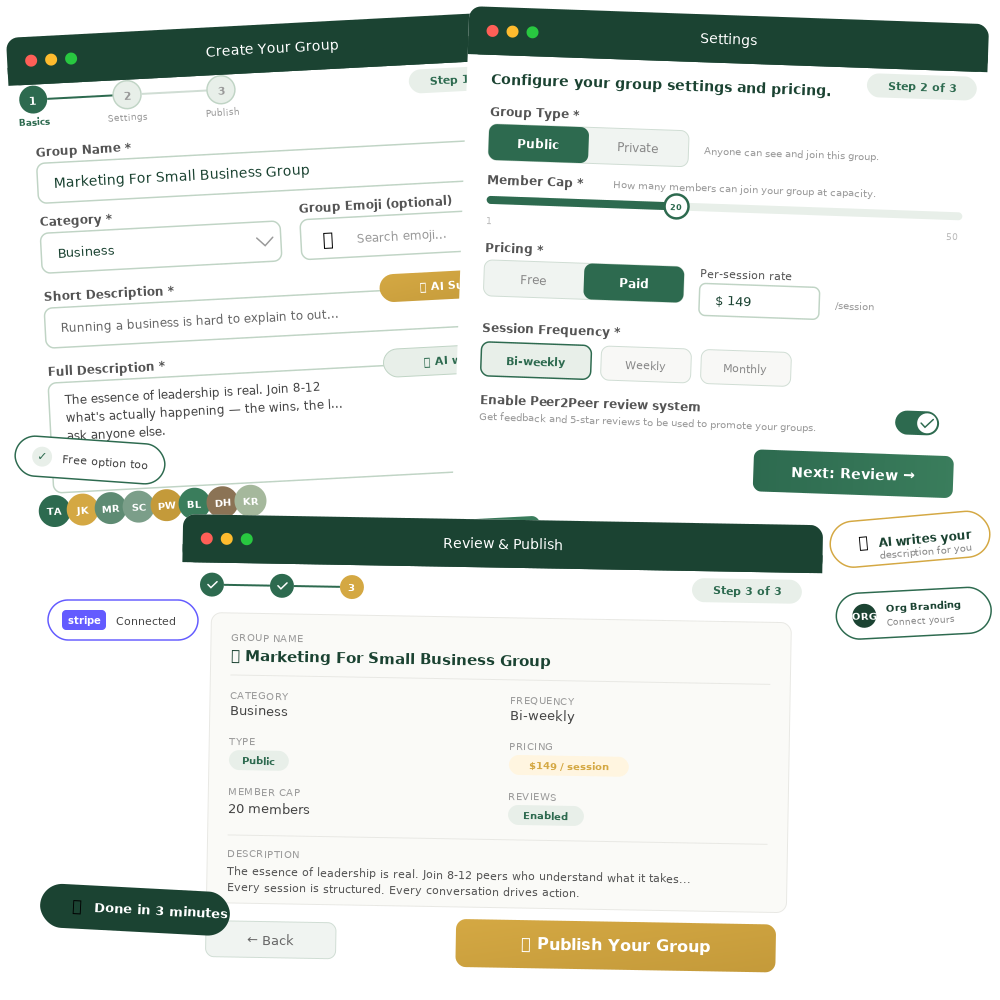
The three-step group creation wizard makes setup simple. Name your group, pick your niche category, write a description (or let AI help you draft one), set your format, and publish.
- ✦Three-step setup wizard: Group Basics → Settings → Review & Publish
- ✦AI-assisted descriptions and tags — not staring at a blank page
- ✦Choose public (anyone joins) or private (you approve each member)
- ✦Set pricing: free or paid groups billed monthly through Stripe
- ✦Choose frequency: weekly, bi-weekly, or monthly
- ✦Set member cap (up to 50)
- ✦Toggle the review/testimony system on or off
- ✦Connect to your Organization's branding if applicable
What you do: Name it. Describe it. Set your price. Publish. Invite your people. Done.
Your members build the agenda. You just show up.
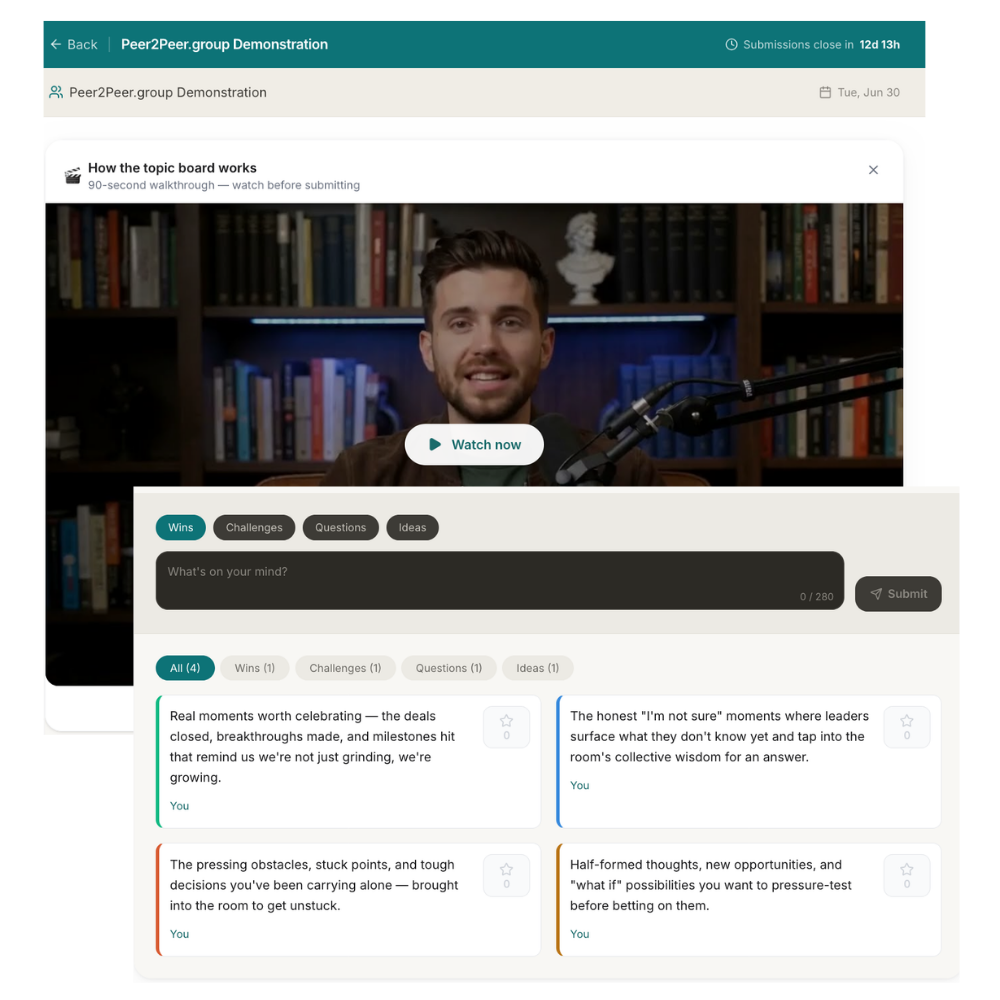
The moment you schedule a session, the Topic Board opens automatically. Members submit wins, challenges, questions, and ideas they want to discuss. The board stays open until the session begins, with a visible countdown timer.
- ✦Creates a Topic Board automatically when a session is scheduled
- ✦Members submit in four categories: Wins, Challenges, Questions, and Ideas
- ✦Topic Board stays open until session start with visible countdown
- ✦New members get an onboarding email explaining the Topic Board, with a 90-second walkthrough video
- ✦Automated reminders at 24 hours, 1 hour, and 10 minutes before session start
- ✦Recurring sessions can be set once — platform handles scheduling from there
What you do: Nothing. Schedule the session and the platform handles the rest.
Lead the conversation. The platform runs everything else.
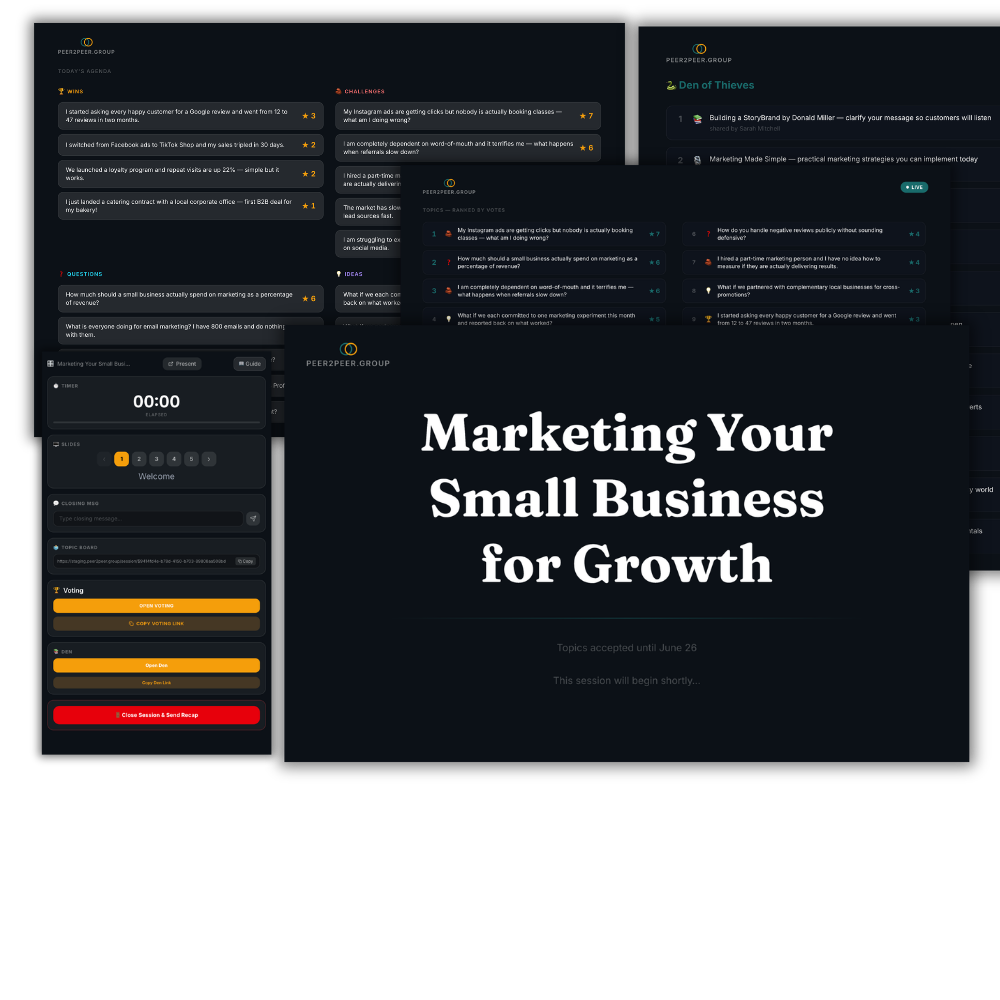
You run the session on your preferred video platform — Zoom, Google Meet, Teams, or Webex. Meanwhile, peer2peer.group runs the Presentation screen your members see alongside the call. You control everything from the Host Panel.
- ✦Timer — tracks elapsed session time
- ✦Slides — navigate through 5 presentation screens
- ✦Voting — open voting with one click, share the link in chat, watch votes tabulate live
- ✦Learning Link — open The Learning Link, share the link, watch resources appear in real-time
- ✦Closing Message — add a custom message for the final slide
- ✦Close Session & Send Recap — ends the session and triggers the post-session sequence
What you do: Lead the conversation. Click through slides at the right moments. Share the voting and Learning Link links in chat. Everything else runs itself.
The value doesn't end when the call does.
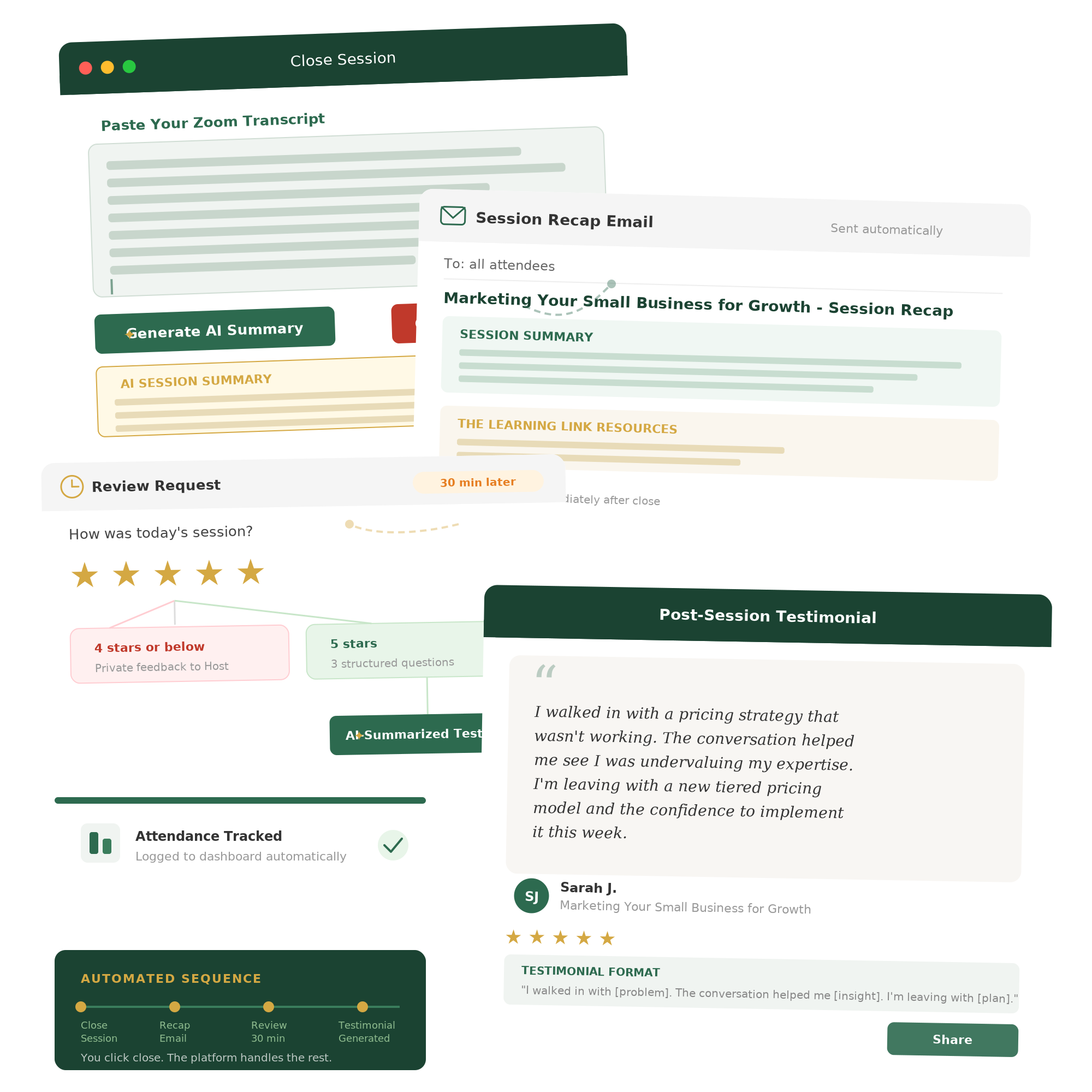
When you close the session, the platform takes over. Paste your video call transcript and the platform generates an AI-powered summary. Then the post-session sequence fires automatically.
- ✦AI session summary — paste your Zoom transcript, get an instant summary
- ✦Recap email to all attendees — includes session summary and full Learning Link resource list
- ✦30 minutes later: Review email asking members to rate 1–5
- ✦4 stars or below: private feedback to Host
- ✦5 stars: Three structured questions, AI-summarized into a shareable testimonial
- ✦Testimonial format: "I walked in with [problem]. The conversation helped me [insight]. I'm leaving with [plan]."
- ✦Attendance tracked and logged to dashboard
What you do: Optionally paste the transcript. Click close. Walk away.
See how your group is doing. Scale when you're ready.
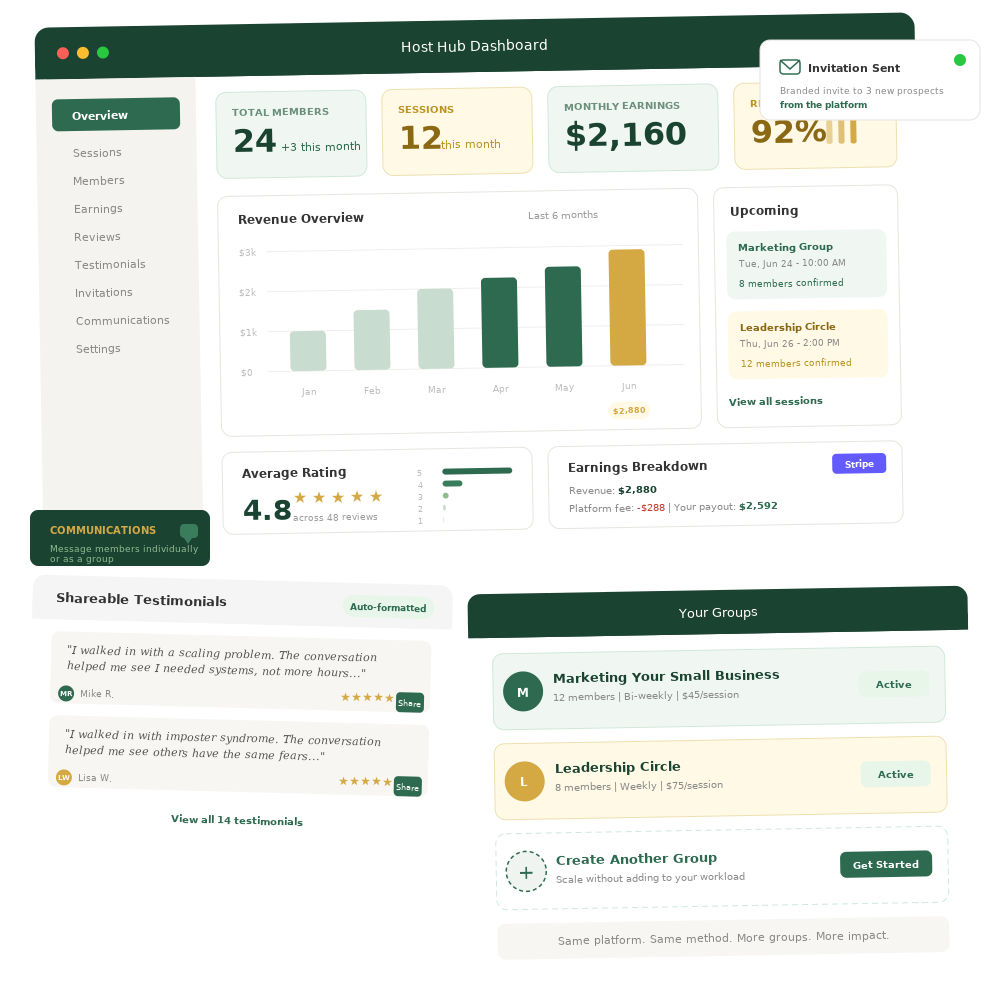
Your Host Hub dashboard gives you a clear picture: total members, sessions this month, upcoming sessions, monthly earnings, and return rate.
- ✦Host Hub dashboard — total members, sessions, upcoming sessions, monthly earnings, return rate
- ✦Earnings tracking — revenue, platform fees, and Stripe payouts
- ✦Review history — session-by-session ratings and feedback
- ✦Testimonials — five-star reviews auto-formatted as shareable quotes
- ✦Invitation emails — send branded invites to new prospects from the platform
- ✦Communications — message members individually or as a group
- ✦Scale — create additional groups without adding to your workload
Everything the platform handles — so you don't have to.
11 automated touchpoints from session scheduling to testimonial collection.
Session scheduled →
Topic Board created and opened automatically
Member joins group →
Onboarding email with Topic Board explanation and 90-second walkthrough video
Host sends invites →
Branded invitation emails sent from the platform to outside contacts
24 hours before →
Session reminder email to all members
1 hour before →
Second reminder email
10 minutes before →
Final reminder email
Session starts →
Topic Board closes, Presentation screen goes live with 15-minute countdown
During session →
Host controls slides, voting, and Learning Link from the Host Panel. Members vote and submit resources live.
Session closes →
Host pastes transcript (optional), AI generates summary, recap email with Learning Link sent to all attendees
30 minutes later →
Review email sent. Members rate 1–5 stars. Five-star ratings generate shareable testimonials.
Ongoing →
Attendance tracked. Earnings logged. Testimonials accumulate. Dashboard updates.